Introduction
Picture this: A marketing manager at a growing startup clicks a phishing link in what looks like a routine vendor email. Within minutes, malware silently installs itself, begins mapping the network, and starts exfiltrating customer data. No alerts fire. No one notices. By the time the breach is discovered weeks later, the damage is catastrophic—and entirely preventable.
This scenario plays out thousands of times each year because traditional antivirus simply can't catch sophisticated attacks that leave no signature. That's the gap Endpoint Detection and Response (EDR) was built to close.
This guide covers what EDR is, how it works across four distinct stages, what threats it catches that antivirus misses, and what growing businesses should look for when evaluating solutions. It also covers how platforms like Osto approach endpoint security in a way that doesn't require a dedicated security operations center.
Key Takeaways
- EDR continuously monitors devices like laptops, servers, and phones to detect and respond to threats in real time
- Unlike antivirus, EDR catches sophisticated attacks (fileless malware, zero-days, insider threats) by analyzing behavior, not static signatures
- Organizations using extensive security AI and automation reduce breach costs by $1.9 million and cut detection time by 80 days
- For growing businesses without dedicated security teams, EDR fills the gaps that antivirus and basic firewalls leave open
What Is Endpoint Detection and Response (EDR)?
Endpoint Detection and Response (EDR) is a cybersecurity solution that continuously monitors endpoint devices to detect, investigate, and respond to threats. The term was coined by former Gartner analyst Anton Chuvakin in July 2013 as "Endpoint Threat Detection & Response" (later shortened to EDR in 2015).
According to NIST, an endpoint is any device used to access a digital identity on a network. In practice, that covers a wide range of hardware:
- Laptops and desktops (including remote work machines)
- Servers and virtual environments
- Mobile phones and tablets
- IoT hardware connected to your network
For growing businesses, every one of these devices is a potential entry point for attackers.
Traditional antivirus relies on known threat signatures — a database of malware fingerprints. When attackers use novel techniques or "living-off-the-land" tactics (legitimate system tools weaponized for malicious purposes), signature-based tools fail completely. EDR fills this gap through behavioral monitoring, watching how software behaves rather than just what files exist.
EDR isn't primarily a prevention tool. It assumes some threats will bypass perimeter defenses and focuses on catching and containing them quickly. This detection-first approach reflects a hard reality in modern security: breaches happen, but rapid response limits the damage.
The market validates this approach: the global EDR market generated $3.55 billion in 2023 and is projected to reach $16.89 billion by 2030, representing 24.9% annual growth as organizations transition from legacy antivirus to behavior-driven security.
How EDR Works: The 4-Stage Operational Flow
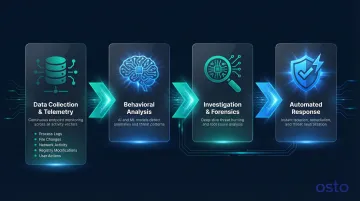
EDR operates as a continuous, cyclical process — always recording and analyzing endpoint activity, not just scanning on demand.
Stage 1: Data Collection and Telemetry
EDR agents installed on each endpoint continuously gather raw telemetry data that forms the foundation for all analysis:
- Process execution logs – every program launched, including command-line arguments
- File system changes – files created, modified, or deleted
- Network connection activity – outbound connections, DNS requests, data transfers
- Registry modifications – Windows registry changes that establish persistence
- User actions – login attempts, privilege escalations, removable media usage
This telemetry maps directly to MITRE ATT&CK Data Sources, which categorize properties relevant to detecting adversary techniques. For example, EDR monitors process creation and loaded modules (DLLs) to identify malicious code masked within benign processes.
Stage 2: Behavioral Analysis and Threat Detection
Collected data flows to a centralized platform where behavioral analytics, machine learning, and rule-based detection analyze it for anomalies. Rather than matching known malware signatures, EDR looks for suspicious behavior patterns.
Example: An executable running from an unusual directory (like a user's temporary folder) attempts to modify system files, disable antivirus, and establish an outbound connection to an unknown IP address. Each action alone might seem benign, but the sequence triggers an alert.
Machine learning identifies deviations from normal patterns, which allows EDR to catch threats that have never been seen before. That said, ML models depend heavily on training data quality — poor data produces false positives or, worse, missed detections. Security teams should review high-confidence alerts manually to distinguish real incidents from noise.
Stage 3: Investigation and Forensics
When suspicious activity is flagged, security analysts (or automated tools) drill down into the event:
- Reconstructing the attack timeline – mapping the sequence from initial compromise to current state
- Tracing execution chains – identifying parent-child process relationships
- Determining root cause – finding the initial entry point (phishing email, vulnerable software, stolen credentials)
- Assessing breach scope – identifying all affected systems and data
EDR's detailed logs and audit trails allow analysts to visualize the complete attack path, answering critical questions: How did the attacker get in? What did they access? Where else have they moved?
Stage 4: Automated Response and Containment
Once the investigation reveals what happened, the priority shifts to stopping it. Global median dwell time is 11 days — every hour of delay gives attackers more time to move laterally and exfiltrate data. Organizations with automated response capabilities contain threats far faster.
EDR enables automated containment actions:
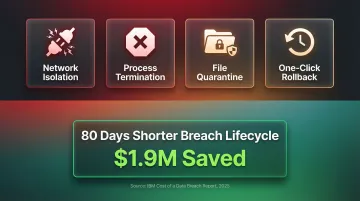
- Network isolation – cutting compromised endpoints off from the network to prevent lateral movement
- Process termination – killing malicious processes immediately
- File quarantine – isolating suspicious files for analysis
- One-click rollback – restoring encrypted files to pre-attack state
According to IBM's 2025 Cost of a Data Breach Report, organizations extensively utilizing security AI and automation shortened breach lifecycles by 80 days and saved $1.9 million compared to those without automation.
Key Capabilities and Benefits of EDR
Granular Visibility Across All Endpoints
EDR acts like a security DVR, recording everything happening across endpoints in real time:
- Process creation and termination
- DNS requests and network connections
- User login activity and privilege changes
- Removable media usage (USB drives, external storage)
- Application installations and updates
This comprehensive visibility enables security teams to answer investigative questions that would be impossible with traditional tools: "Which users accessed this file in the past 30 days?" "What processes has this executable spawned across our environment?"
Detection of Advanced Threats
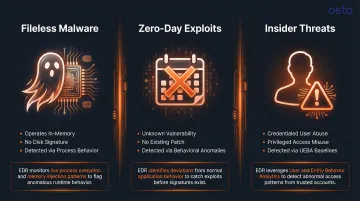
Fileless malware operates entirely in memory or leverages legitimate system tools like PowerShell, leaving no disk-based signatures for antivirus to detect. EDR catches these attacks by monitoring process behavior—such as PowerShell executing obfuscated commands or accessing sensitive data.
Zero-day exploits target vulnerabilities unknown to vendors and the public, meaning no signature exists yet. EDR counters zero-days through behavioral detection, identifying suspicious actions like reflective code loading (allocating and executing payloads directly in memory).
Insider threats come from credentialed employees who abuse authorized access. EDR addresses these through User and Entity Behavior Analytics (UEBA), which establishes baselines of normal user behavior and alerts when employees access unusual data volumes, use administrative tools outside normal patterns, or attempt data exfiltration.
Proactive Threat Hunting
Automated alerts only catch what detection rules are built to flag. Threat hunters go further — querying historical telemetry to test hypotheses, trace lateral movement, and surface dormant threats that haven't triggered any alerts yet.
A common example: hunting for all instances of cmd.exe spawned by Office processes, which can reveal macro-based attacks that slipped past signature detection. This kind of targeted query turns raw EDR data into active defense.
Faster Incident Response and Reduced Dwell Time
Automated containment and detailed forensic data dramatically reduce time between initial compromise and full remediation. Organizations discovering breaches internally averaged $4.18 million in costs compared to $5.08 million when notified by attackers — a $900K gap that makes fast internal detection a financial priority, not just a security one.
For ransomware specifically, median dwell time is just 6 days globally—meaning speed of detection and response directly determines whether attackers can deploy ransomware successfully.
Compliance and Audit Support
EDR's continuous logging and data retention provide detailed activity records organizations need for regulatory compliance audits (SOC 2, ISO 27001, GDPR) and post-incident reporting. For SOC 2 audits specifically, auditors want to see continuous monitoring evidence and documented response actions — EDR logs provide exactly that, reducing the manual work of compiling proof during audit cycles.
EDR vs. Antivirus, XDR, and MDR: Key Differences
EDR vs. Antivirus (AV)
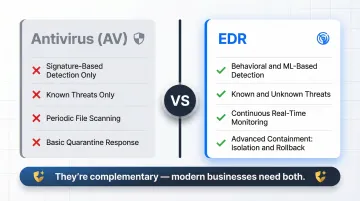
| Feature | Antivirus (AV) | Endpoint Detection & Response (EDR) |
|---|---|---|
| Methodology | Signature-based detection and heuristic analysis | Continuous monitoring, behavioral analysis, machine learning |
| Threat Scope | Known malware (viruses, worms, trojans) | Known and unknown threats, fileless attacks, zero-days, APTs |
| Focus | Prevention through file scanning | Detection, investigation, and response |
| Response | Predefined actions (quarantine/delete) | Advanced containment (network isolation, process termination, rollback) |
Key takeaway: AV is a basic filter for known malicious files; EDR provides continuous, behavior-driven security. They are complementary, not interchangeable—modern businesses need both layers.
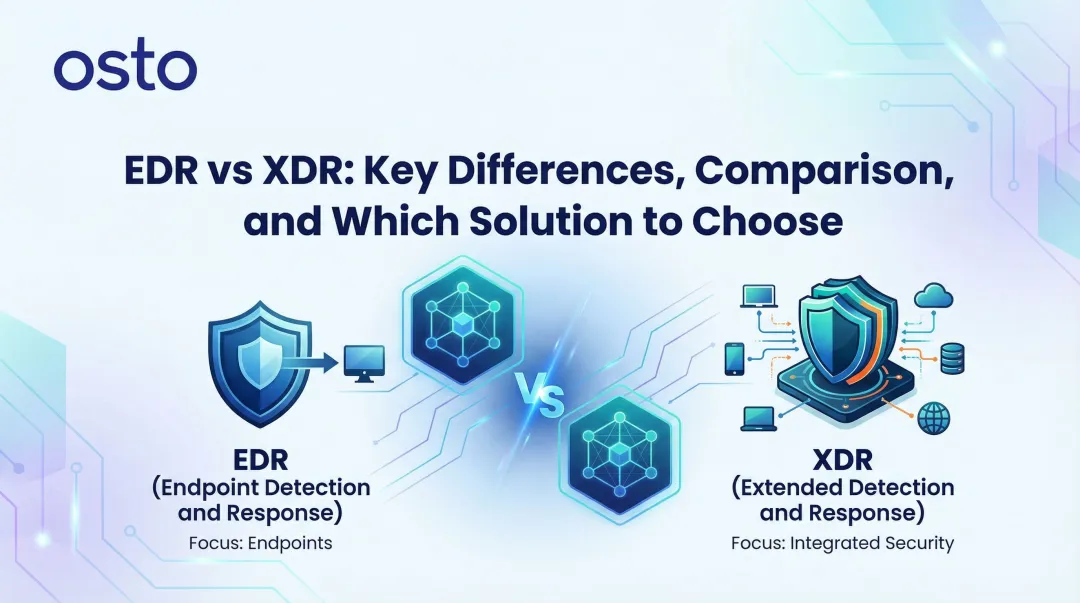
EDR vs. XDR (Extended Detection and Response)
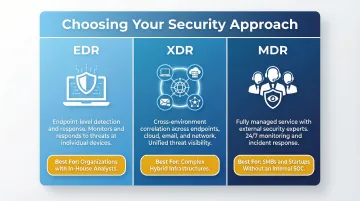
XDR expands EDR's scope beyond endpoints to correlate data from network, cloud, email, and identity sources. Forrester defines XDR as a cloud-native platform unifying security detections across multiple surfaces.
This expansion is critical because 30% of breaches involve data distributed across multiple environments (on-premises, public cloud, private cloud). XDR breaks down data silos, giving security teams full cross-environment attack visibility and enabling correlation of alerts across different environments.
When to choose XDR: Larger enterprises with complex, hybrid infrastructures facing multi-layered threats benefit from XDR's broader telemetry correlation.
EDR vs. MDR (Managed Detection and Response)
XDR addresses what gets monitored — MDR addresses who does the monitoring. MDR is a managed service where a third-party security team operates EDR (or XDR) tools on your behalf, providing 24/7 monitoring, threat hunting, and incident response.
With 48% of organizations reporting severe security skills shortages and security analysts costing upwards of $120,000 annually, building an internal Security Operations Center (SOC) is prohibitively expensive for most growing businesses.
When to choose MDR: Startups, SMBs, and scaling enterprises lacking in-house security talent should use MDR to run EDR technology with expert human threat hunting — no internal SOC required.
What Growing Businesses Should Look for in an EDR Solution
Ease of Deployment and Management
Growing businesses without dedicated SOC teams need solutions with:
- Lightweight agents that don't degrade endpoint performance
- Cloud-based management eliminating on-premises infrastructure requirements
- Centralized dashboards providing unified visibility across all endpoints
- Automatic device discovery ensuring no endpoints slip through the cracks
Osto is built for exactly this scenario—unified security visibility across endpoints, web applications, and cloud environments from a single dashboard, without the overhead of stitching together multiple tools.
Detection Accuracy and Low False-Positive Rates
For small teams, alert fatigue is a critical risk. 64% of SOC teams report being overwhelmed by false positives, leading to analyst burnout and ignored critical warnings.
Look for EDR solutions with:
- ML-powered detection tuning that learns your environment and reduces noise
- Risk-based prioritization surfacing the most critical threats first
- Customizable alert thresholds tailored to your organization's risk tolerance
- Automated triage filtering routine events so analysts focus on real threats
Integration with a Broader Security Ecosystem
EDR shouldn't operate in isolation. Integration with SIEM (Security Information and Event Management) and SOAR (Security Orchestration, Automation and Response) platforms greatly enhances response to stealthy attacks by combining logs, behavioral indicators, and threat intelligence feeds.
Osto's platform natively correlates endpoint activity with web application threats, cloud security posture findings, and identity-based signals. That cross-domain correlation is what turns isolated alerts into actionable incident context, giving lean security teams a complete picture without managing five separate consoles.
Frequently Asked Questions
What is endpoint detection and response (EDR)?
EDR is a cybersecurity solution that continuously monitors endpoint devices to detect, investigate, and respond to threats using behavioral analysis and automation, going beyond traditional signature-based blocking. It assumes some threats will slip past prevention and focuses on rapid detection and containment instead.
What data does an EDR collect?
EDR collects the following telemetry from every monitored endpoint:
- Process execution logs
- File system and registry changes
- Network connection records
- User login activity
- Removable media usage
This data provides the raw material for behavioral analysis and forensic investigation.
How does EDR compare to XDR and MDR?
EDR focuses on endpoint-level detection. XDR extends that coverage to network, cloud, and email layers, giving security teams correlated visibility across the full environment. MDR takes a different approach entirely — it's a managed service where external security experts operate those tools on behalf of organizations that don't have in-house analysts.
What are the 4 phases of incident response?
According to NIST SP 800-61r3, the phases are Preparation, Detection & Analysis, Containment & Eradication, and Recovery. EDR directly supports Detection, Containment, and Eradication through automated monitoring and response capabilities.
Why is endpoint protection (EDR) on my PC?
If EDR is installed on your work device, your organization is monitoring it for security threats to protect both the device and company network. The agent runs in the background, collecting telemetry and responding to suspicious activity with minimal impact on normal use.