Introduction
For decades, Virtual Private Networks (VPNs) served as the default remote access tool for businesses—a reliable encrypted tunnel connecting remote workers to corporate networks. Now, as workforces shift to hybrid models and infrastructure moves to the cloud, VPNs are showing their age—and Zero Trust Network Access (ZTNA) is stepping in as a credible replacement.
For growing businesses, the stakes are real. Picking the wrong solution can expose sensitive data to breaches, frustrate remote teams with latency issues, or create infrastructure costs that don't scale.
With 56% of organizations reporting VPN-related attacks in 2023–2024 and Gartner projecting that 70% of new remote access deployments will use ZTNA by 2025, this isn't a purely technical decision—it's a strategic one that affects your security posture, budget, and growth trajectory.
Key Takeaways
- VPN gives broad network access via an encrypted tunnel; ZTNA grants access only to specific apps after verifying identity and device health
- ZTNA operates on "never trust, always verify"—access isn't assumed even after login
- VPN suits small, on-premises environments; ZTNA excels for remote, hybrid, or cloud-first operations
- ZTNA leads on security, scalability, and user experience; VPN still works for legacy systems and network-level tasks
- Many organizations run both during transition, using ZTNA for most access and VPN for edge cases
What is a VPN?
A Virtual Private Network (VPN) is a security tool that creates an encrypted tunnel between a user's device and a corporate network over the public internet. This allows remote users to access resources as if they were physically on-site. Common VPN protocols—OpenVPN, IKEv2/IPsec, and SSTP—establish and secure these connections, each with distinct characteristics:
| Protocol | Primary Use Case | Security Characteristics |
|---|---|---|
| OpenVPN | General secure access, business VPNs | Highly secure and auditable (open-source), but difficult to configure and requires networking expertise |
| IKEv2/IPsec | Mobile users, site-to-site connections | Fast reconnection during network changes, but complex configuration and key management |
| SSTP | Windows environments, bypassing firewalls | Uses SSL/TLS encryption over port 443, but proprietary to Microsoft |
These protocols drove VPN adoption for three core reasons:
- Data encryption protects sensitive information in transit from interception
- IP masking shields user privacy and location from external observers
- Remote access lets employees and partners connect from anywhere globally
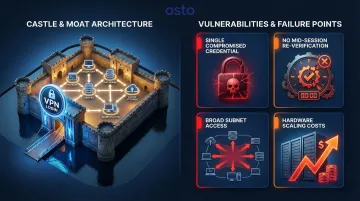
The fundamental issue with VPNs is their "castle and moat" security model. Once a user authenticates, they often gain broad network-wide access far beyond what their role requires.
The 2021 Colonial Pipeline ransomware breach shows exactly where this breaks down. Attackers used a single compromised VPN password—no MFA required—to gain initial access and move laterally across the network, ultimately disrupting critical infrastructure.
Additional limitations include:
- Routing bottlenecks: All traffic must pass through a central server or data center, introducing latency—especially problematic for cloud and SaaS applications
- Limited visibility: IT teams have minimal insight into what users do once connected beyond basic connection metadata
- Management overhead: VPN configurations can be complex, requiring fixed license counts and additional hardware infrastructure (VPN concentrators) when scaling for larger or distributed teams
Scaling VPN infrastructure demands significant hardware investment. A Cisco Secure Firewall 3105 supports up to 2,000 VPN peers; moving to the 3140 model gets you 20,000—but at a steep price. That hardware cost is one reason a Forrester study found that replacing legacy VPNs saved organizations up to $1.75 million annually in licensing and infrastructure costs.
Use Cases of VPN
VPN still fits well in specific scenarios:
- On-premises infrastructure: Organizations with minimal cloud usage and mostly internal applications
- Network-level access: Network administrators performing infrastructure tasks requiring full network visibility
- Legacy applications: Systems that cannot integrate with modern authentication frameworks
- Field technicians: Workers needing persistent corporate network access
- Small businesses: Organizations with simple IT environments in early cloud migration stages
What is ZTNA?
Zero Trust Network Access (ZTNA) moves security away from network location as a trust signal. According to NIST SP 800-207, it eliminates the concept of implicit trust based on network location. Instead, access to any application is granted only after continuously verifying the user's identity, device posture, and contextual signals (location, behavior, time).
Three foundational principles:
- Continuous verification: All authentication and authorization are dynamic and strictly enforced before access is allowed, continually reevaluating trust throughout the session
- Least-privilege access: Access rules are as granular as possible, enforcing only the minimum privileges needed for the requested action
- Assume breach: The model assumes an attacker is already present, requiring heavy scrutiny of all users, devices, and data flows
How ZTNA works in practice:
Rather than opening up the entire network, ZTNA connects a verified user directly to the specific application they need—and only for that session. Business-critical apps remain invisible to the internet until a user passes all verification checks. Lightweight connectors deployed alongside applications establish outbound-only connections to a cloud-based trust broker, with no inbound open ports. This "application cloaking" approach means unauthorized users and external scanners cannot discover applications, reducing the risk of a material breach by up to 55%.
Core operational benefits:
- Connects users directly to apps via the closest cloud edge, eliminating traffic backhauling
- Flags non-compliant or compromised devices mid-session through continuous posture checks
- Delivers transparent access once verified — no VPN client to toggle on and off
- Creates a "segment of one" between user and application, blocking lateral movement
Deployment approaches:
| Feature | Agent-Based ZTNA | Agentless ZTNA |
|---|---|---|
| Mechanism | Software client installed on endpoint | Browser-based access via reverse proxy |
| Device Posture | Deep visibility (OS version, patch level, EDR status) | Limited to browser-level telemetry |
| Primary Use Cases | Corporate-managed devices, thick client apps | Contractors, BYOD, web-based SaaS apps |
The right model depends on device management capabilities. Most organizations deploy both to cover managed and unmanaged devices. Where your workforce sits on that spectrum shapes which ZTNA use cases matter most.
Use Cases of ZTNA
ZTNA excels in modern work environments:
- Gives remote and hybrid teams direct access to SaaS and cloud apps without performance hits from backhauling
- Enforces consistent access policies across AWS, Azure, and GCP from a single control plane
- Grants vendors and contractors time-limited, app-specific permissions with no network-wide exposure
- Satisfies strict compliance requirements in healthcare (HIPAA), financial services (PCI-DSS), and government sectors through granular audit trails
- Scales to new remote users without proportional hardware investment — cloud-native by design
The global ZTNA market reflects this shift, projected to grow from $1.34 billion in 2025 to $4.18 billion by 2030, representing a 25.5% CAGR.
ZTNA vs VPN: How They Compare
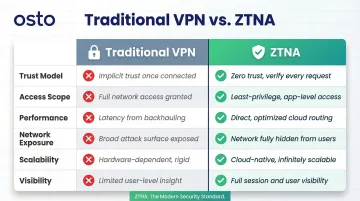
| Capability | Traditional VPN | Zero Trust Network Access (ZTNA) |
|---|---|---|
| Trust Model | Implicit trust after initial login | Continuous verification throughout session |
| Access Scope | Broad network-wide access (subnet/port level) | Granular per-application, per-session access |
| Performance | Backhauling through central server creates latency | Direct-to-app routing via closest cloud edge |
| Network Exposure | High; public-facing IP addresses vulnerable to scanning | None; applications cloaked via outbound-only connections |
| Scalability | Constrained by hardware appliance capacity | Highly elastic; leverages global cloud infrastructure |
| Deployment Complexity | Requires VPN concentrators, load balancers, ongoing patching | Cloud-native; no hardware appliances needed |
| Visibility | Limited to connection metadata | Granular session-level logging (who, what, when, where) |
| Best Fit | On-premises environments, legacy systems, network admin tasks | Cloud-first, hybrid workforces, compliance-driven industries |
Trust Model: Once vs. Continuous Verification
VPN authenticates once at login and then trusts the user for the entire session. If an attacker compromises credentials mid-session or a device becomes infected, the VPN has no mechanism to detect or respond.
ZTNA continuously re-evaluates identity, device health, and behavioral context throughout the session. A compromised credential or non-compliant device gets flagged and blocked immediately — even after initial access is granted.
Access Scope: Network-Wide vs. Application-Specific
VPN's broad network access is a liability the moment an attacker gets in. With network-level visibility across subnets and resources, they can move laterally and probe anything connected.
ZTNA's per-app, per-session access model contains any breach to that specific application. There's no network to traverse — each application is an isolated segment, invisible to everything else.
Performance: Backhauling vs. Direct Connection
VPN backhauling forces traffic through a central data center before it ever reaches a cloud application — then back again. This "trombone effect" hits hardest for SaaS tools like Microsoft 365 or Salesforce, where latency compounds with every request.
ZTNA routes users directly to the application via the nearest cloud point of presence. A Forrester study found this saved users an average of 1.75 minutes per connection — 15 hours of recovered productivity per user annually.
Visibility: Connection Logs vs. Session Intelligence
Performance differences are visible in dashboards. Visibility differences show up during an incident — and that gap between VPN and ZTNA is stark.
VPN gives IT teams limited insight: a connection was established, how long it lasted, and how much bandwidth it used. That's it.
ZTNA logs the full session — who accessed which application, from which device, at what time, from where, and what actions they took. When an auditor asks you to prove least-privilege access, or a SOC analyst needs to trace an anomaly back to its source, that record is the difference between an hour-long investigation and a week-long one.
Which Security Solution Is Right for Your Business?
Key factors to evaluate:
- Workforce distribution: What percentage of employees work remotely vs. on-site?
- Cloud adoption: Do you primarily use SaaS and cloud applications, or on-premises systems?
- IT team size: Can you maintain hardware appliances and complex configurations?
- Compliance requirements: Do you need granular audit trails for HIPAA, PCI-DSS, or SOC 2?
- Legacy applications: Are there systems that cannot integrate with modern authentication?
Choose VPN if:
- Your organization is primarily on-premises with minimal cloud usage
- Your team is small and mostly works from a central office
- You need straightforward remote access to internal systems
- Budget constraints prevent cloud service adoption
- Legacy applications require network-level connectivity
Choose ZTNA if:
- Your workforce is distributed or hybrid
- You rely heavily on cloud or SaaS tools
- Compliance requirements demand granular access controls and audit trails
- You're scaling quickly without plans to grow a large IT department
- Security incidents or VPN vulnerabilities have created risk
The Phased Approach: ZTNA + VPN During Transition
ZTNA isn't an all-or-nothing replacement. A phased approach works well:
- Start with high-risk applications: Protect the most sensitive or frequently accessed applications with ZTNA first
- Maintain VPN for legacy needs: Keep VPN for remaining legacy or network-level requirements
- Gradually expand ZTNA coverage: As applications modernize, migrate them to ZTNA
- Retire VPN hardware: Once ZTNA covers 80–90% of use cases, you can drop the remaining VPN infrastructure entirely
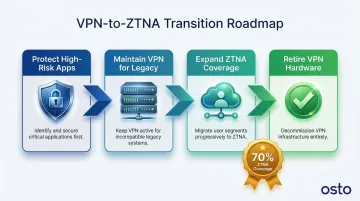
Gartner predicts that ZTNA can replace VPN for approximately 70% of remote access use cases, with the remaining 30% requiring network-level access for legacy systems or specialized administrative tasks.
That split plays out in practice — and the businesses that move early tend to see the clearest gains.
Real-World Success: Applied Systems
Company Profile: Applied Systems, a mid-market insurance software provider with 2,500+ employees.
The Challenge: Applied Systems relied on Cisco AnyConnect VPN for internal access. It was sluggish, created developer friction, and granted excessive network access across the board. Scaling the hardware to match their cloud-native growth would have doubled infrastructure costs — so they replaced it with Cloudflare's Zero Trust platform.
Measurable Outcomes:
- Scaled network connectivity without adding hardware or bandwidth — avoiding a 100% cost increase
- Moved 2,500+ employees from default-allow to default-deny posture with granular device checks
- Secured AI tool usage by running ChatGPT in isolated browsers, blocking sensitive data from leaking
Osto: ZTNA Built for Growing Businesses
Osto is built for businesses that need serious security coverage without a large IT team behind it. The platform includes:
- Zero Trust Network Access with MFA and secure authentication workflows
- Cloud security posture management across AWS, Azure, and GCP from a single dashboard
- Automated discovery of cloud resources with built-in misconfiguration checks
- Unified visibility across web applications, endpoints, and cloud infrastructure
- No dedicated hardware or complex configuration required
If the decision framework above points toward ZTNA, Osto is worth a closer look. Reach out to the Osto team to walk through your specific setup.
Conclusion
VPN and ZTNA serve fundamentally different security philosophies. VPN was built for a perimeter-defined world where employees worked from offices and applications lived in data centers. ZTNA was designed for today's distributed, cloud-first reality where work happens everywhere and applications live in the cloud.
The right choice depends on your infrastructure stage and workforce model, not a universal winner. For small, on-premises organizations with minimal cloud adoption, VPN works well. For growing businesses with remote teams, cloud infrastructure, and compliance requirements, ZTNA delivers measurably better security, performance, and scalability.
For modern work environments, ZTNA consistently wins on the outcomes that matter most:
- Reduces unauthorized access risk by verifying every user and device before granting access
- Lowers infrastructure overhead as teams scale, without adding VPN hardware or licenses
- Delivers smoother remote experiences by routing users directly to applications, not through a central hub
If you're evaluating your security posture, start with an honest audit of how your teams actually work and where your applications live. Platforms like Osto provide ZTNA natively alongside endpoint protection and cloud security — so you're not stitching together separate tools as your needs grow.
Frequently Asked Questions
What is the difference between VPN and ZTNA?
VPN creates an encrypted tunnel granting broad network access after a single login, while ZTNA grants access only to specific applications based on continuous identity and device verification. This represents a fundamental shift from perimeter-based security to identity-based security.
Can ZTNA replace VPN?
ZTNA can replace VPN for most use cases, particularly application-level access. Organizations with legacy systems or network-level admin tasks may still need VPN alongside ZTNA, making a hybrid approach common during transition.
Is ZTNA more secure than VPN?
Yes, ZTNA is more secure. It continuously verifies users and devices throughout a session, and unlike VPN, it:
- Limits access to only what's needed (least-privilege)
- Hides applications from the public internet
- Prevents lateral movement if credentials are compromised
What is the best alternative to a VPN?
ZTNA is the leading modern alternative, especially for businesses with remote teams and cloud infrastructure. For organizations needing broader coverage, SASE (Secure Access Service Edge) bundles ZTNA with tools like Secure Web Gateway and Cloud Access Security Broker into a single framework.
Are VPNs becoming obsolete?
VPNs still serve specific use cases — legacy system access and network-level admin tasks — but they are no longer sufficient as the primary remote access solution for cloud-dependent businesses. Major vendors like Fortinet and Cisco are actively deprecating legacy VPN features, signaling a clear industry direction.
What should a growing business consider before switching to ZTNA?
Before switching, evaluate:
- Access patterns: Which apps and users need remote access today
- Identity provider compatibility: Does ZTNA integrate with Azure AD, Okta, or your current IdP
- Legacy app support: Whether older applications require a gateway or proxy approach
- Rollout strategy: A phased start with high-risk applications is often more practical than a full cutover