Introduction
The modern workplace operates on mobile. With 90% of employees now using a mix of company-issued and personal devices for work, the enterprise attack surface has shifted. The rapid adoption of remote and hybrid work models has transformed mobile endpoints from convenience tools into critical infrastructure—and unmanaged devices accessing corporate data become serious security and compliance liabilities.
70% of mobile devices impacted by cyberattacks are personal, unmanaged devices, while the global average cost of a data breach has reached $4.44 million. For startups and scaling businesses without dedicated security teams, the challenge is acute: how do you secure a distributed device fleet without overwhelming your IT resources?
This article breaks down what cloud-based Mobile Device Management (MDM) is, evaluates the top platforms available today, and provides a framework for choosing the right solution based on your organization's size, OS diversity, and security requirements.
TL;DR
- Cloud-based MDM centralizes device management, security enforcement, and policy control across employee devices — no on-premises infrastructure required
- Top platforms include Microsoft Intune, Hexnode UEM, IBM MaaS360, Jamf, and ManageEngine Mobile Device Manager Plus
- Selection criteria: cross-platform support, BYOD containerization, remote control, compliance reporting, and integration with identity and SIEM platforms
- Prioritize fit over brand name — match platform capabilities to your device mix, compliance needs, and IT team size
What Is Cloud-Based MDM?
Mobile Device Management (MDM) is a software-based approach to centrally enroll, configure, monitor, and secure mobile devices—smartphones, tablets, and laptops—that access corporate networks and data. It gives IT administrators the ability to push apps, enforce encryption, restrict operating systems, and remotely wipe data if a device is lost or compromised.
The cloud-based distinction matters. Unlike on-premises MDM, which requires local server infrastructure and manual updates, cloud-based (SaaS) MDM operates entirely from the cloud. This means automatic updates, no hardware overhead, and the ability to manage globally distributed device fleets from any location.
The Global Unified Endpoint Management Market is expected to reach $30.73 billion by 2032, growing at 22.0% annually. Cloud-native device management is no longer an emerging option — it's the operational standard.
MDM vs. EMM vs. UEM
Understanding the terminology helps clarify vendor capabilities:
- MDM (Mobile Device Management): Focuses on device-level controls—enrollment, configuration, security policies, remote wipe
- EMM (Enterprise Mobility Management): Extends MDM to include mobile application management (MAM) and content management
- UEM (Unified Endpoint Management): Manages all endpoints—desktops, mobile devices, and IoT—through a single console, using both agent and agentless approaches
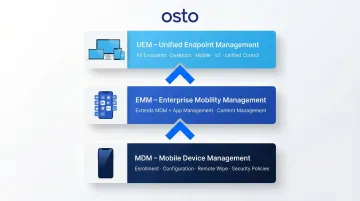
Today's leading "MDM" platforms have largely become UEM tools. When evaluating vendors, expect coverage well beyond smartphones and tablets.
Top 5 Cloud-Based MDM Platforms
These platforms were selected based on cross-platform support, security feature depth, deployment flexibility, and real-world adoption across businesses of varying sizes. Each entry below includes a feature summary table, licensing context, and analyst recognition to help you compare options quickly.
Microsoft Intune
Microsoft Intune is Microsoft's cloud-based endpoint and app management solution, deeply integrated with the Microsoft 365 ecosystem and widely adopted across enterprises and SMBs alike.
What makes it stand out: Seamless integration with Azure Active Directory (Entra ID), conditional access policies, and native support for Windows, iOS, Android, and macOS make it the default choice for organizations already in the Microsoft stack. Its strength lies in enforcing Zero Trust access controls at the device level—leveraging Entra Conditional Access as its policy engine to evaluate risk signals in real time and automatically block compromised devices.
| Aspect | Details |
|---|---|
| Supported Platforms | Windows, macOS, iOS/iPadOS, Android, Linux, Chrome OS |
| Key Features | Conditional Access with Entra ID, App Protection Policies (MAM without enrollment), integration with Microsoft Defender for Endpoint, automated compliance reporting |
| Best For | Enterprises or SMBs using Microsoft 365 |
Licensing: Intune is included in Microsoft 365 Business Premium, E3, and E5 licenses, making it highly cost-effective for organizations already in the Microsoft ecosystem.
Analyst Recognition: Named a Leader in the 2024 Gartner Magic Quadrant for Endpoint Protection Platforms and the IDC MarketScape: Worldwide Unified Endpoint Management Software 2024 Vendor Assessment.
Hexnode UEM
Hexnode UEM is the MDM/UEM product of Mitsogo Inc., positioned as a unified endpoint management platform for IT and security teams managing diverse device fleets.
What makes it stand out: Its Smart Kiosk mode, robust BYOD containerization, cross-platform policy management, and seamless integration with Active Directory, Google Workspace, and Microsoft 365 make it especially effective for organizations managing mixed corporate and personal device environments. Hexnode excels in kiosk management—locking down Android phones, tablets, and TVs in single-app or multi-app modes for field teams or public-facing deployments.
| Aspect | Details |
|---|---|
| Supported Platforms | Android, Fire OS, iOS, macOS, Linux, ChromeOS, visionOS, tvOS, Windows |
| Key Features | Smart Kiosk mode, BYOD containerization, remote view and control for troubleshooting, automated reporting, Azure AD and Google Workspace integration |
| Best For | BYOD-heavy organizations, mid-sized businesses managing mixed device environments |
Analyst Recognition: Recognized as an Honorable Mention in the 2026 Gartner Magic Quadrant for Endpoint Management Tools and consistently rated as a High Performer on G2.
IBM MaaS360
IBM MaaS360 is IBM's AI-powered unified endpoint management platform, designed to help IT and security teams manage and secure Android, iOS, Windows, and macOS devices at enterprise scale.
Watson AI for risk analytics sets MaaS360 apart—delivering real-time insights into device threats, malicious app detection, and incident triage so security teams can act without manually sifting through raw logs. The platform also offers strong BYOD and containerization controls, mobile threat management, and app tunneling through its Mobile Enterprise Gateway (MEG) module, which provides secure access to behind-the-firewall resources without a traditional VPN.
| Aspect | Details |
|---|---|
| Supported Platforms | iOS, macOS, Android, Windows |
| Key Features | Watson AI risk analytics, mobile threat management, app tunneling (MEG), SSO, automated policy enforcement |
| Best For | Mid-market to enterprise organizations requiring AI-driven security insights |
Analyst Recognition: Named a Leader in the IDC MarketScape: Worldwide Unified Endpoint Management Software 2022 Vendor Assessment.
Jamf
Jamf is a cloud-based MDM platform built exclusively for Apple devices—macOS, iOS, iPadOS, tvOS, visionOS, and watchOS—and holds the largest market share for Apple fleet management in enterprise environments, with approximately 71,000 active customers globally as of December 2022.
Jamf's Apple-native architecture leverages Apple's own management frameworks—Automated Device Enrollment, Volume Purchase Program, and the MDM protocol—more deeply than any cross-platform tool can. Its Auto Apps feature automates macOS patch management, while compliance templates built on CIS Benchmarks and the macOS Security Compliance Project (mSCP) reduce manual policy work.
Deep identity integration through Jamf Connect (SSO) rounds out the offering for Apple-centric organizations that need both security enforcement and a frictionless user experience.
| Aspect | Details |
|---|---|
| Supported Platforms | macOS, iOS, iPadOS, tvOS, visionOS, watchOS |
| Key Features | Zero-touch deployment via Apple Business Manager, Auto Apps patching, compliance automation (CIS, mSCP), Jamf Connect SSO, FedRAMP High and DoD IL5 authorization in progress |
| Best For | Organizations running an all-Apple or primarily Apple device fleet |
Analyst Recognition: Named a Leader in the 2026 Gartner Magic Quadrant for Endpoint Management Tools and the IDC MarketScape: Worldwide Unified Endpoint Management Software for Apple Devices 2025–2026 Vendor Assessment.
ManageEngine Mobile Device Manager Plus
ManageEngine Mobile Device Manager Plus, a product of Zoho Corporation, is a comprehensive MDM solution supporting an exceptionally wide range of device types and operating systems.
A single console covers smartphones, tablets, laptops, rugged devices, and IoT endpoints across Android, iOS, macOS, Windows, Chrome OS, and tvOS. Flexible cloud and on-premises deployment options combined with a cost-effective pricing model make it a practical choice for SMBs managing diverse hardware environments.
Standout operational features include remote troubleshooting across 25+ device brands, a drag-and-drop custom report builder, and granular Role-Based Access Control (RBAC) for delegating routine tasks without overexposing admin privileges.
| Aspect | Details |
|---|---|
| Supported Platforms | Android, iOS, iPadOS, tvOS, macOS, Windows, Chrome OS |
| Key Features | Kiosk mode, drag-and-drop report builder, remote troubleshooting (25+ brands), RBAC, app management, flexible cloud and on-premises deployment |
| Best For | Small to mid-sized organizations managing diverse multi-OS device fleets |
Analyst Recognition: Named a Challenger in the 2026 Gartner Magic Quadrant for Endpoint Management Tools and a Strong Performer in The Forrester Wave: Unified Endpoint Management, Q4 2023.
Key Features to Look for in a Cloud-Based MDM Solution
Cross-Platform and BYOD Support
Broad OS coverage (iOS, Android, Windows, macOS) and containerization of personal vs. corporate data are table stakes for any distributed or mixed device environment. With 70% of organizations now supporting BYOD policies, containerization creates a virtual boundary within a device—separating corporate apps and data from personal space, preserving employee privacy while enforcing enterprise policies.
Remote Device Control and Lifecycle Management
Remote-first teams depend on lifecycle management capabilities that require no physical device access:
- Over-the-air enrollment and remote lock/wipe
- Real-time troubleshooting and software distribution
- Zero-touch deployment — devices ship directly to employees, enroll automatically on first power-on
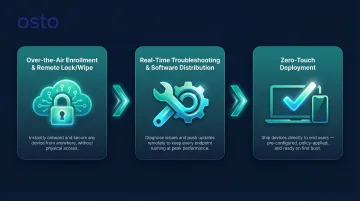
These capabilities keep distributed teams operational without burdening IT with hands-on provisioning.
Policy Enforcement and Compliance Reporting
Granular policy controls paired with automated compliance reports keep organizations audit-ready across internal governance and external regulatory requirements. Key controls to evaluate include:
- Encryption requirements and password policies
- Geo-fencing rules and app allow/deny lists
- Automated compliance reporting tied to device state
MDM serves as the enforcement layer for device-level validation — a critical component in any Zero Trust architecture.
App Management and Kiosk Capabilities
App distribution, containerization, and kiosk mode prevent unauthorized app usage and protect corporate data—particularly important for field teams and BYOD deployments. Kiosk mode locks down devices to a single app or a set of apps, ideal for retail, healthcare, or public-facing environments.
Zero Trust and Identity Integration
The strongest MDM deployments pair device-level controls with identity and access management (SSO, MFA, conditional access) and Zero Trust Network Access. For growing businesses, platforms that integrate with a Zero Trust security posture—such as Osto's ZTNA capability—extend protection beyond device management into network access, application security, and cloud posture in one consolidated platform.
How We Chose the Best Cloud-Based MDM Platforms
Each platform was evaluated across five criteria:
- Cross-platform device support depth
- Security feature completeness
- Ease of cloud deployment and onboarding
- Scalability for growing teams
- Breadth of integrations with IT and identity tools
Common Mistakes Organizations Make
- Choosing on brand name or price alone — without evaluating OS mix, BYOD policies, and integration fit — leads to deployment complexity and costly re-platforming.
- Picking a platform that handles 50 devices but breaks down at 500 creates real operational friction as your team grows.
- Overly restrictive BYOD policies hurt user experience and push employees toward shadow IT adoption, defeating the purpose of the MDM entirely.
- MDM only secures the device layer. Without network, identity, and cloud security posture controls alongside it, your defense has gaps.
Business Outcomes That Should Guide Selection
Avoiding these mistakes is only half the equation. The real measure of a good MDM choice is what it delivers operationally: shorter mean-time-to-remediation for device incidents, lower IT overhead for provisioning, stronger compliance posture, and reliable support for remote work. Those outcomes — not feature checklists — should drive the final decision.
Conclusion
Cloud-based MDM is no longer optional for businesses with distributed teams or BYOD policies. The right platform delivers centralized control, security enforcement, and compliance visibility without requiring heavy on-premises infrastructure.
When evaluating MDM solutions, weigh your specific environment rather than defaulting to popularity rankings. Key factors include:
- Size and growth trajectory of your device fleet
- OS diversity (iOS, Android, Windows, macOS)
- BYOD vs. corporate-owned device policies
- Compliance obligations (HIPAA, SOC 2, GDPR)
- Integration with your existing security stack
MDM secures the device layer, but a complete security posture requires coverage at the network, application, and cloud level too. Osto's cybersecurity platform, built for startups and scaling enterprises, complements MDM deployments with Zero Trust Network Access, web application protection, and cloud security posture management — all in one unified platform. Reach out at connect@osto.one to learn more.
Frequently Asked Questions
What is the difference between cloud-based MDM and on-premises MDM?
Cloud-based MDM is delivered as SaaS with no local server infrastructure required—it offers automatic updates, remote accessibility, and faster deployment. On-premises MDM requires internal hardware and maintenance but may offer more control over data residency.
What is the difference between MDM, EMM, and UEM?
MDM focuses on device-level management. EMM builds on that with app and content controls, while UEM goes further to cover all endpoints — desktops, IoT devices, and wearables. Most modern platforms have evolved into full UEM tools.
Which MDM solution is best for small businesses or startups?
Platforms like ManageEngine Mobile Device Manager Plus and Hexnode are strong choices for SMBs due to their affordable pricing, multi-OS support, and ease of deployment. Microsoft Intune is ideal if the organization is already using Microsoft 365.
How does MDM support BYOD policies?
MDM enables BYOD by creating containerized work profiles on personal devices—separating corporate data from personal content, enforcing security policies on the work side, and allowing remote wipe of only corporate data without affecting personal information.
What security features should a cloud-based MDM solution include?
Look for these capabilities at minimum:
- Remote lock and wipe for lost or compromised devices
- Data encryption at rest and in transit
- App allow/deny controls and policy enforcement
- Multi-factor authentication support
- Integration with SIEM tools or Zero Trust frameworks
Can MDM replace a full cybersecurity stack?
No. MDM manages and secures the device layer but does not replace broader cybersecurity needs. A complete security posture also requires network-level protection, web application security, identity management, and cloud configuration monitoring — each addressing attack surfaces that MDM alone cannot reach.